Internal Linking Strategies for Shopify Stores
Build a powerful internal linking structure for your Shopify store. Learn proven strategies to improve SEO, user experience, and conversions.
Internal linking is one of the most powerful (and underutilized) SEO tactics for Shopify stores. While most merchants focus on building external backlinks, the links within your own site control how search engines discover, understand, and rank your pages.
This guide shows you how to build an internal linking strategy that improves rankings, keeps shoppers engaged, and drives more sales.
Why Internal Linking Matters
Internal links serve multiple critical functions:
1. Distribute Page Authority
When your homepage earns backlinks, that authority can flow to other pages through internal links. Without internal links, authority stays trapped on a few pages.
2. Help Search Engines Discover Pages
Google follows links to find new pages. Orphaned pages (with no internal links) may never get indexed.
3. Establish Site Hierarchy
Internal links show Google which pages are most important and how they relate to each other.
4. Improve User Experience
Strategic links guide shoppers to relevant products, reducing bounce rates and increasing time on site.
5. Increase Pages Per Session
More internal links = more opportunities for shoppers to explore = more products viewed = higher conversion probability.
The Internal Linking Hierarchy
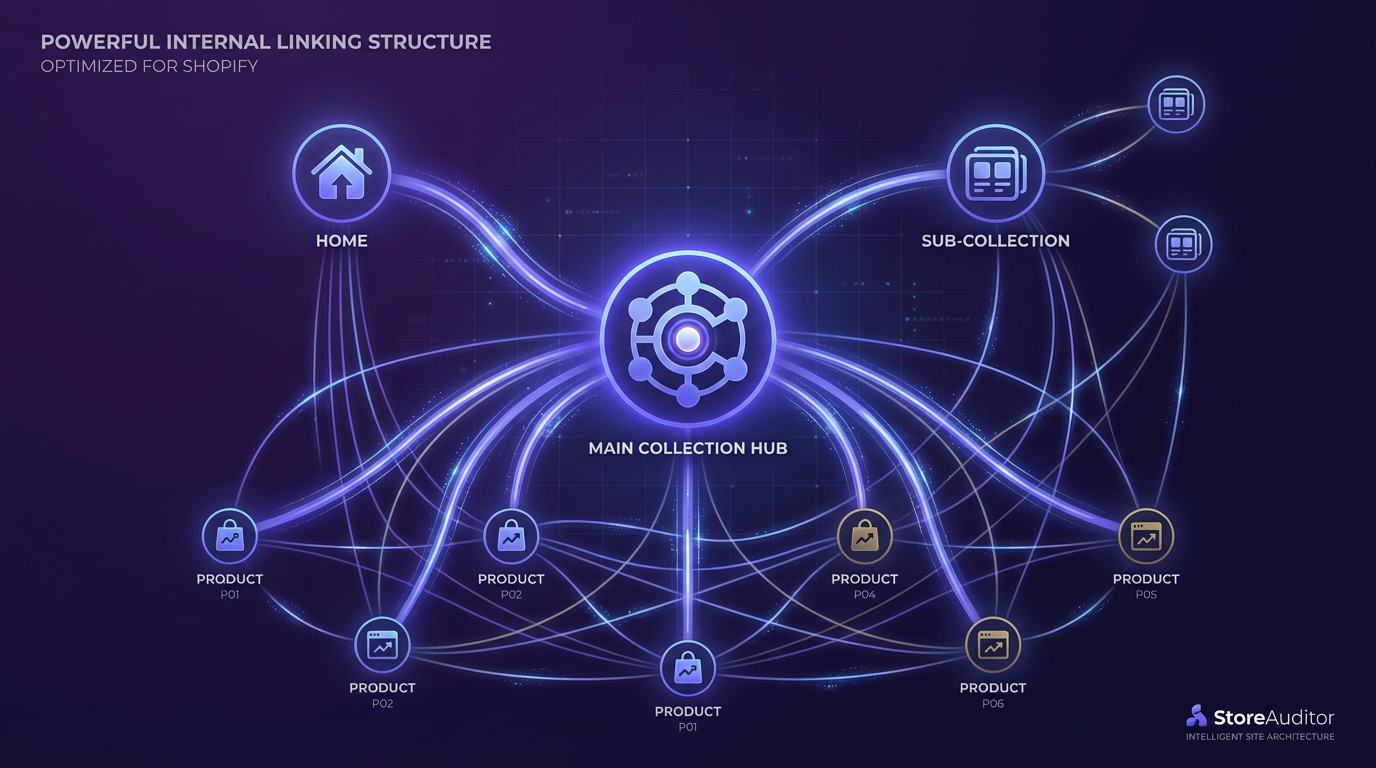
A well-structured Shopify store follows a pyramid hierarchy:
                   Homepage
                      │
        ┌─────────────┼─────────────┐
        │             │             │
   Collection    Collection    Collection
        │             │             │
    ┌───┴───┐     ┌───┴───┐     ┌───┴───┐
    │       │     │       │     │       │
 Product Product Product Product Product Product
Link flow principle: Higher-level pages link down to lower-level pages, and lower-level pages link up and across.
Types of Internal Links
1. Navigation Links
Links in your header, footer, and menus.
Best practices:
- Include all main collections in header navigation
- Add secondary pages to footer (About, Contact, FAQ)
- Use mega menus for stores with many collections
- Make navigation consistent across all pages
2. Breadcrumb Links
Show the path from homepage to current page.
Home > Men's Shoes > Running Shoes > Nike Air MaxBenefits:
- Help users navigate backward
- Reinforce site structure for Google
- Appear in search results as rich snippets
3. Contextual Links
Links within page content (descriptions, blog posts, etc.).
Examples:
- Product description: “Pairs well with our leather belt”
- Blog post: “Check out our complete guide to running shoes”
- Collection intro: “See our new arrivals”
4. Related Products/Collections
“You may also like” or “Customers also bought” sections.
Best practices:
- Show 3-6 related items
- Base recommendations on actual behavior data when possible
- Include links to related collections, not just products
5. Footer Links
Often overlooked, footer links appear on every page.
Include:
- Main collections
- Popular products or categories
- Company pages (About, Contact)
- Legal pages (Privacy, Terms)
- Blog or resource section
Internal Linking Strategies by Page Type
Homepage
Your homepage should link to:
- All main collections (via navigation and content)
- Featured/bestselling products (4-8 products)
- New arrivals or seasonal collections
- Blog or content hub
- About/Trust pages
Link quantity: 50-100+ internal links is normal for homepages
Collection Pages
Collection pages should link to:
- All products in the collection (automatic via grid)
- Parent collection (via breadcrumbs)
- Related collections (“You might also like”)
- Subcollections (if applicable)
- Featured products (in intro text)
- Buying guides (in below-grid content)
Example intro text:
Shop our collection of men’s running shoes. Whether you need trail runners or road running shoes, we have you covered. Not sure where to start? Read our running shoe buying guide.
Product Pages
Product pages should link to:
- Parent collection (via breadcrumbs)
- Related products (You may also like)
- Complementary products (“Complete the look”)
- Size guides or FAQs (for common questions)
- Blog posts (if relevant guides exist)
Example in product description:
This premium leather wallet features RFID-blocking technology. Pair it with our matching leather belt for a complete set, or see all leather accessories.
Blog Posts
Blog posts are internal linking goldmines. Link to:
- Relevant products (naturally within content)
- Related collections (when discussing categories)
- Other blog posts (related reading)
- Resource pages (guides, FAQs)
Example:
When choosing running shoes, consider your pronation type. For overpronators, we recommend the Brooks Adrenaline GTS or browse our full selection of stability running shoes.
About/Company Pages
These pages should link to:
- Homepage (obvious but often missing from content)
- Key collections (what you sell)
- Contact page (if separate)
- Trust signals (reviews, certifications)
Anchor Text Best Practices
Anchor text is the clickable text of a link. It matters for SEO.
Do’s
✓ Use descriptive text
Check out our [leather wallets](/collections/leather-wallets)✓ Include keywords naturally
Learn more about [Shopify SEO optimization](/blog/shopify-seo-guide)✓ Vary anchor text Don’t use the same text for every link to a page
✓ Match user intent
[View size guide](/pages/size-guide) ← Clear actionDon’ts
✗ Avoid “click here”
For more info, [click here](/products/wallet) ← Bad✗ Avoid over-optimization
Buy the [best cheap leather wallet for men 2024](/products/wallet) ← Too spammy✗ Avoid naked URLs
Check out https://store.com/products/wallet ← Not helpfulIdentifying Internal Linking Opportunities
Method 1: Content Audit
Review each page and ask:
- What other pages would help this reader?
- What products relate to this content?
- What next steps make sense for the user?
Method 2: Search Your Own Site
Use Google’s site search:
site:yourstore.com "keyword"Find pages that mention a topic but don’t link to related content.
Method 3: Analytics Review
In Shopify Analytics or Google Analytics:
- Find high-exit pages → Add links to keep users engaged
- Find pages with low pageviews → Add more links pointing to them
- Find popular paths → Strengthen those linking patterns
Method 4: Crawl Your Site
Use tools like Screaming Frog to:
- Find orphan pages (no internal links)
- Identify pages with few incoming links
- Map your current link structure
Common Internal Linking Mistakes
Mistake 1: Orphan Pages
Pages with no internal links pointing to them. Google may not find or value these pages.
Fix: Ensure every page has at least 2-3 internal links from other pages.
Mistake 2: Too Many Links on One Page
Having 500+ links on a single page dilutes the value of each link.
Fix: Focus navigation and content links on the most important pages.
Mistake 3: Broken Internal Links
Links to pages that no longer exist or have moved.
Fix: Regularly audit for 404 errors. Set up redirects when changing URLs.
Mistake 4: Deep Linking Ignored
Only linking to collections, never to individual products.
Fix: Include product-level links in blog content, related products, and collection descriptions.
Mistake 5: Ignoring Blog Content
Creating blog posts that don’t link to products or collections.
Fix: Every blog post should include 2-5 relevant internal links to products or collections.
Mistake 6: Same Anchor Text Everywhere
Using identical text for all links to a page.
Fix: Vary anchor text naturally while keeping it relevant.
Building a Linking Strategy for Large Catalogs
Tiered Approach
Tier 1: Top Priority (most internal links)
- Homepage
- Main collection pages
- Bestselling products
- Key blog posts/guides
Tier 2: Medium Priority
- Subcollection pages
- Popular products
- Supporting blog content
Tier 3: Lower Priority
- Individual products (beyond bestsellers)
- Older blog posts
- Utility pages
Scaling Content Links
For stores with 1000+ products, manual linking isn’t practical. Use:
- Automated related products (Shopify apps or built-in features)
- Collection-based linking (focus on collection pages)
- Strategic blog content (target keywords that link to many products)
- Template-based linking (add standard links to product templates)
Measuring Internal Linking Success
Metrics to Track
| Metric | Tool | What It Shows |
|---|---|---|
| Pages per session | Google Analytics | Link engagement |
| Bounce rate | Google Analytics | Entry page quality |
| Internal link clicks | Hotjar/heatmaps | Which links get clicked |
| Crawl depth | Screaming Frog | How accessible pages are |
| Page authority flow | Ahrefs/Moz | Link equity distribution |
Before/After Analysis
When improving internal links:
- Document current metrics for target pages
- Implement linking changes
- Wait 2-4 weeks for impact
- Compare new metrics to baseline
Internal Linking Checklist
Site-Wide
- All main collections in header navigation
- Footer includes key page links
- Breadcrumbs enabled on products and collections
- No orphan pages
- No broken internal links
Collection Pages
- Intro text with contextual links
- Related collections linked
- Subcollections properly linked
- Buying guides linked (if applicable)
Product Pages
- Related products section active
- Description includes relevant links
- Breadcrumbs show collection path
- Size guide/FAQ linked (if applicable)
Blog Posts
- Each post has 3-5 internal links
- Products and collections linked naturally
- Related posts linked
- CTAs link to relevant pages
Homepage
- Featured collections linked
- New arrivals/bestsellers linked
- Blog/content hub linked
- About/trust pages linked
Automate Internal Link Analysis
Manually tracking internal links across hundreds of pages is impractical. StoreAuditor helps by:
- Identifying pages with few incoming internal links
- Finding orphan pages that need links
- Analyzing link distribution across your store
- Suggesting linking opportunities based on content
The goal is a cohesive internal linking structure that guides both search engines and shoppers through your store.
Key Takeaways
- Internal links distribute authority: Pages without links don’t rank well
- Every page needs incoming links: No orphan pages
- Use descriptive anchor text: Tell users and Google what they’ll find
- Link contextually: Add links within content, not just navigation
- Blog posts are linking opportunities: Every post should link to products
- Vary your anchor text: Don’t over-optimize with identical text
- Audit regularly: Fix broken links and find new opportunities
Internal linking is free, fully within your control, and compounds over time. There’s no excuse not to do it well.
Want to analyze your store’s internal linking structure? Try StoreAuditor free and discover linking opportunities across your entire catalog.